

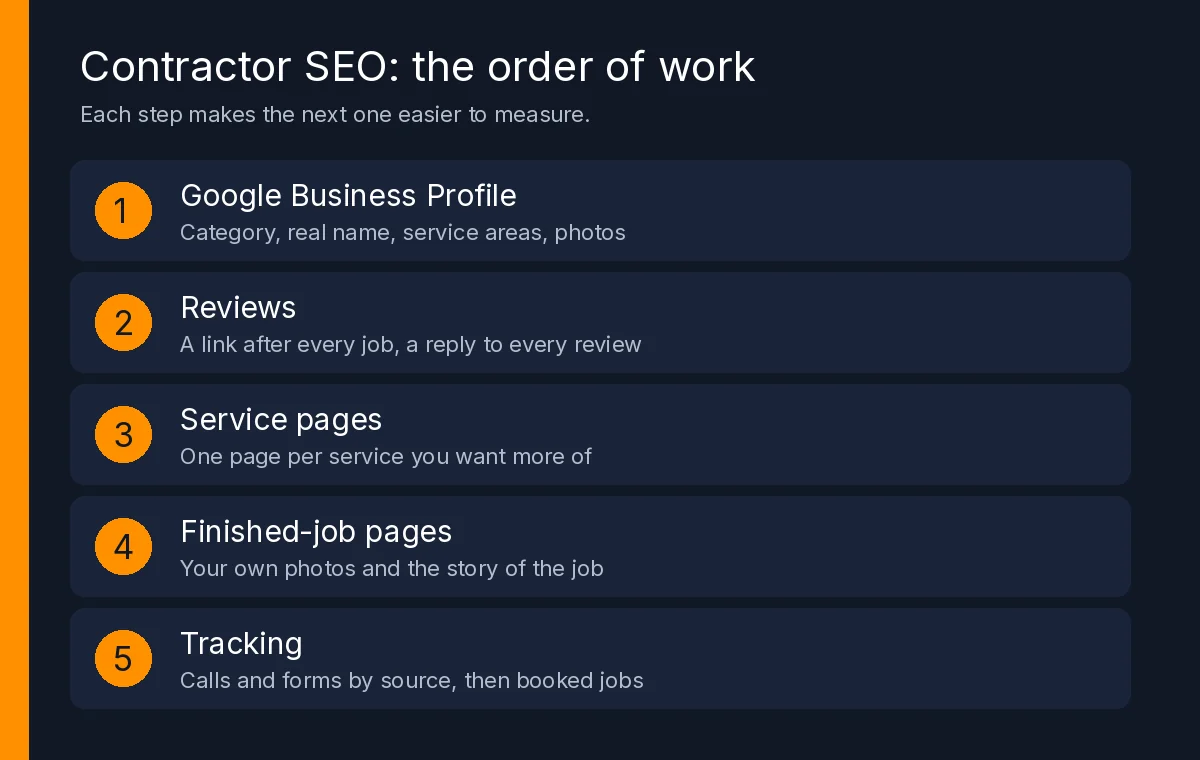
Contractor SEO is the work that puts your business in front of a homeowner who is searching for a job you do. Do it in this order: finish your Google Business Profile, ask for a review after every job, give each service its own page, show your finished work, and track which calls turn into booked jobs.
This guide covers that order, the limits Google sets, and the work to skip.
How contractor SEO works: what Google decides and what you control
Google's own help page says local results are "mainly based on relevance, distance, and popularity." You cannot change one of the three. You can work on the other two.
| Factor | What Google says | What you can do |
|---|---|---|
| Relevance | "how well a Business Profile matches what someone is searching for" | Fill in the profile completely and build a page for each service you sell. |
| Distance | "how far each business is from the customer who’s searching" | Nothing, except setting an honest service area. |
| Prominence | "how well-known a business is," based partly on "how many websites link to your business and how many reviews you have" | Earn real reviews and real links from local sources. |
The same Google Business Profile help page adds: "There's no way to request or pay for a better local ranking on Google." Anyone who promises you a spot is promising something Google says nobody can buy.
Contractor SEO in order: your first 90 days
This is a working order, not a promise of results. Each step makes the next one easier to see.
1. Fix your Google Business Profile first
The profile is what shows on the map and in local results, so it comes before the website. Google's representation guidelines set the rules, and most profile problems come from breaking them.
- Category: Google's guideline reads, "Choose the fewest number of categories it takes to describe your overall core business." Pick the one that matches the work you want more of.
- Name: it "should reflect your business’s real-world name," as used on your signs, website and paperwork. Do not add a city or a service to it.
- One profile: Google says there "should only be one profile per business."
- Services, photos and hours: list every service you do, add photos of your own jobs, and answer the phone when the profile says you are open.
If you go to customers rather than meeting them at an office, read Google's page on service areas before you set yours. It says: "If you don't serve customers at your business address, remove your address from your Business Profile."
You can list up to 20 service areas. Google adds that "the boundaries of your overall area shouldn’t be more than about 2 hours of driving time from where your business is based."
2. Ask for a review after every job
Reviews feed prominence, and they also decide whether a homeowner calls you or the next name on the list. Google's review tips say you can ask customers to visit a Google link or scan a QR code. Send that link by text at the end of the job, while the customer is still happy.
Reply to every review, good or bad, with a detail from the job. Never pay for one. Google says offering "free or discounted goods or services" in exchange for reviews is "considered fake & misleading content and is strictly prohibited."
3. Give each service you want more of its own page
One page that lists ten services gives a homeowner, and Google, little to match. Build a separate page for each job you want more of, such as roof replacement, bathroom remodels or panel upgrades. Each page should say:
- what the service is and who it fits
- how the job runs from estimate to cleanup
- what changes the price, in plain words
- which towns you do it in
- photos from your own jobs
- the questions homeowners ask before they call
- one clear way to call or request an estimate
A website built to take quote requests matters here, because a page that ranks but has no obvious phone number or form wastes the visit.
4. Show finished jobs
A project page is the one thing a competitor cannot copy: what the job was, what went wrong, what you did and how it turned out, with your own photos. Use real photos only. Do not show stock images or renderings as finished work. Link each project page to the service page it supports.
5. Track every call and form by source
Give the website, the Business Profile and any ads their own phone number or tag, and write down which leads became booked jobs. Rankings are not the goal. A free tool like Google Search Console shows which searches bring people to your site, and your own job list shows which of them paid.
How many service area pages does a contractor need?
Only as many as you have real reasons for. A page for every town within driving distance, all with the same text and a different town name, is the pattern Google's spam policies call doorway abuse. Its examples include "multiple domain names or pages targeted at specific regions or cities that funnel users to one page."
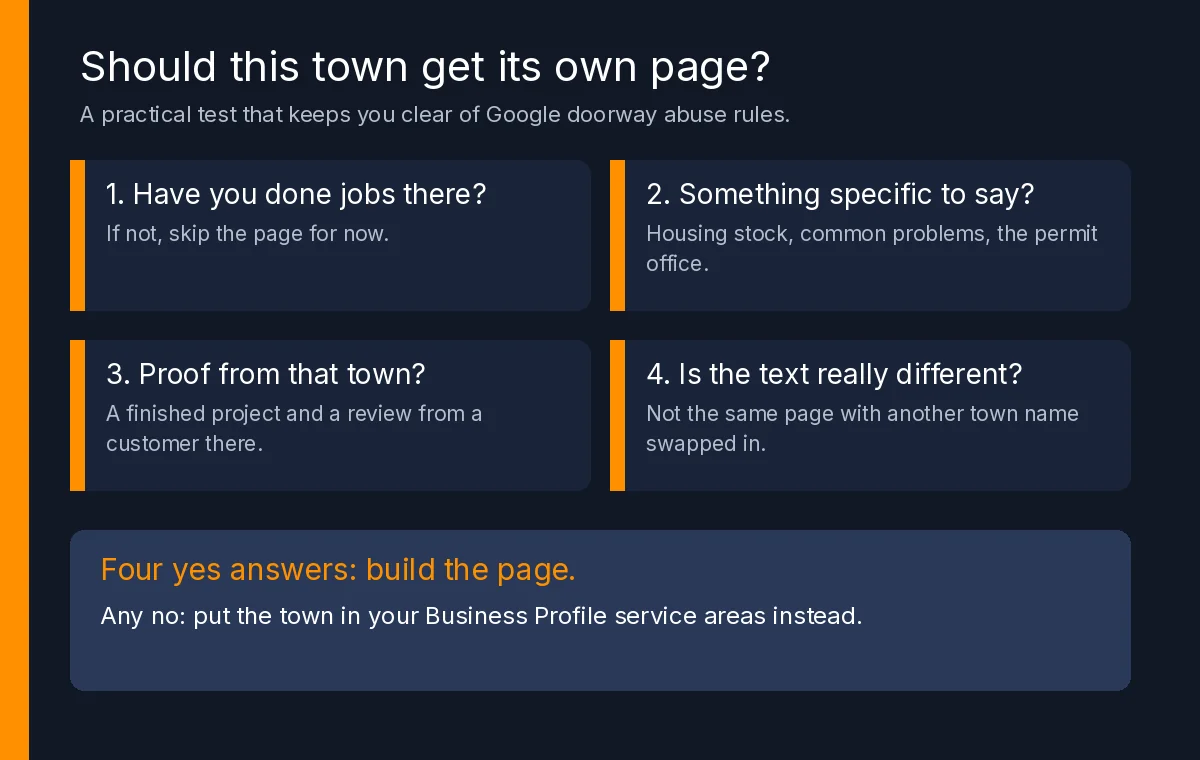
Start with the towns where you have finished jobs and can name something specific: the housing stock, a common problem, the permit office. Add a project from that town and a review from a customer there if you have one. Five pages like that are worth more than fifty copies.
A first-week list for contractor SEO
If you only have an hour or two this week, do these in order:
- Claim and verify your Business Profile, or find out who controls it today.
- Check that the name, category, phone number and service areas match what is on your truck and invoices.
- Upload ten photos from recent jobs.
- Text your last five happy customers your Google review link.
- Pick the one service you most want more of and write down what its page needs.
- Set up a way to note where each new call came from.
Contractor SEO work to skip or question
- A promised ranking. Google says local rankings cannot be requested or bought.
- Paid or traded reviews. Prohibited, as quoted above, and they put your profile at risk.
- Keywords in the business name, or several profiles. Both break the representation guidelines.
- Dozens of near-identical city pages. See the doorway policy above.
- A vendor that owns your profile or your tracking. Our rule of thumb: you should hold the owner login to your own Business Profile, Search Console and call records, so you can leave without starting over.
How long contractor SEO takes, and how to tell it is working
Google's SEO Starter Guide is plain about timing: "Some changes might take effect in a few hours, others could take several months." It suggests waiting a few weeks to assess whether a change helped.
So judge the work on a schedule. Each month, count calls and forms by source and how many became booked jobs. If the profile and pages are in place and the number is flat after a few months, look at what you are targeting, not at the vendor's report.
When contractor SEO is not the first thing to buy
If you are booked out for weeks and cannot take another call, do the free work: finish the profile, ask for reviews, and let referrals carry you. Pay for more visibility when you have crew to serve it.
If you need work this month, SEO is too slow to be the answer by itself. Start with referrals and Google Ads you can switch off, and read our guide to construction leads for the other ways contractors fill a schedule.
Nanotom Labs does local SEO for contractors as a monthly service, with a page and a Google Business Profile post each week. If your gap is something else, you may not need us. See the trades we work with, or start a project.
Frequently asked questions
How long does contractor SEO take to work?
Google says some changes take effect in hours and others take several months. A complete, accurate Business Profile can start helping first. New service pages and reviews take longer. Judge it by booked jobs after a few months, not by rankings after a few weeks.
Can I do contractor SEO myself?
Yes, most of the first steps are free: the Google Business Profile, review requests, accurate service areas and one page per service. It takes steady time rather than skill. Hire help when the work stops fitting around jobs, not before.
How many service area pages should a contractor have?
One for each town where you have done work and can say something specific about it. Google's doorway policy targets near-identical pages built to catch searches in many places, so fewer, better pages are safer than many thin ones.
Does contractor SEO work for general contractors and construction companies?
The steps are the same: a complete profile, reviews, a page for each type of project and pages for finished jobs. A general contractor or construction company usually has fewer, larger projects, so each project page and each review carries more weight. Write up every finished job.
Is SEO better than Google Ads for contractors?
They solve different problems. Ads can bring calls while the schedule is open and stop when you pause them. SEO builds slower and keeps working without a charge per click. Many contractors need the free SEO basics in place either way.
Do I need a website if I have a Google Business Profile?
The profile can bring calls on its own, but a website gives each service a page, a place for finished jobs and a form for quotes. It also gives you data in Search Console. If you use only the profile, keep it complete and active.